A set of ready to use scientific skills for Claude
git clone https://github.com/K-Dense-AI/claude-scientific-skills ~/.claude/skills/scientific# Claude Scientific Skills
[](LICENSE.md)
[](#whats-included)
> 💼 For substantially more advanced capabilities, compute infrastructure, and enterprise-ready offerings, check out [k-dense.ai](https://k-dense.ai/).
A comprehensive collection of **125+ ready-to-use scientific skills** for Claude, created by the K-Dense team. Transform Claude into your AI research assistant capable of executing complex multi-step scientific workflows across biology, chemistry, medicine, and beyond.
These skills enable Claude to seamlessly work with specialized scientific libraries, databases, and tools across multiple scientific domains:
- 🧬 Bioinformatics & Genomics - Sequence analysis, single-cell RNA-seq, gene regulatory networks, variant annotation, phylogenetic analysis
- 🧪 Cheminformatics & Drug Discovery - Molecular property prediction, virtual screening, ADMET analysis, molecular docking, lead optimization
- 🔬 Proteomics & Mass Spectrometry - LC-MS/MS processing, peptide identification, spectral matching, protein quantification
- 🏥 Clinical Research & Precision Medicine - Clinical trials, pharmacogenomics, variant interpretation, drug safety, precision therapeutics
- 🧠 Healthcare AI & Clinical ML - EHR analysis, physiological signal processing, medical imaging, clinical prediction models
- 🖼️ Medical Imaging & Digital Pathology - DICOM processing, whole slide image analysis, computational pathology, radiology workflows
- 🤖 Machine Learning & AI - Deep learning, reinforcement learning, time series analysis, model interpretability, Bayesian methods
- 🔮 Materials Science & Chemistry - Crystal structure analysis, phase diagrams, metabolic modeling, computational chemistry
- 🌌 Physics & Astronomy - Astronomical data analysis, coordinate transformations, cosmological calculations, symbolic mathematics, physics computations
- ⚙️ Engineering & Simulation - Discrete-event simulation, multi-objective optimization, metabolic engineering, systems modeling, process optimization
- 📊 Data Analysis & Visualization - Statistical analysis, network analysis, time series, publication-quality figures, large-scale data processing
- 🧪 Laboratory Automation - Liquid handling protocols, lab equipment control, workflow automation, LIMS integration
- 📚 Scientific Communication - Literature review, peer review, scientific writing, document processing, publication workflows
- 🔬 Multi-omics & Systems Biology - Multi-modal data integration, pathway analysis, network biology, systems-level insights
- 🧬 Protein Engineering & Design - Protein language models, structure prediction, sequence design, function annotation
**Transform Claude Code into an 'AI Scientist' on your desktop!**
> ⭐ **If you find this repository useful**, please consider giving it a star! It helps others discover these tools and encourages us to continue maintaining and expanding this collection.
---
## 📦 What's Included
This repository provides **125+ scientific skills** organized into the following categories:
- **26+ Scientific Databases** - Direct API access to OpenAlex, PubMed, ChEMBL, UniProt, COSMIC, ClinicalTrials.gov, and more
- **54+ Python Packages** - RDKit, Scanpy, PyTorch Lightning, scikit-learn, BioPython, PennyLane, Qiskit, and others
- **15+ Scientific Integrations** - Benchling, DNAnexus, LatchBio, OMERO, Protocols.io, and more
- **20+ Analysis & Communication Tools** - Literature review, scientific writing, peer review, document processing
Each skill includes:
- ✅ Comprehensive documentation (`SKILL.md`)
- ✅ Practical code examples
- ✅ Use cases and best practices
- ✅ Integration guides
- ✅ Reference materials
---
## 📋 Table of Contents
- [What's Included](#whats-included)
- [Why Use This?](#why-use-this)
- [Getting Started](#getting-started)
- [Claude Code](#claude-code-recommended)
- [Cursor IDE](#cursor-ide)
- [Any MCP Client](#any-mcp-client)
- [Prerequisites](#prerequisites)
- [Quick Examples](#quick-examples)
- [Use Cases](#use-cases)
- [Available Skills](#available-skills)
- [Contributing](#contributing)
- [Troubleshooting](#troubleshooting)
- [FAQ](#faq)
- [Support](#support)
- [Join Our Community](#join-our-community)
- [Citation](#citation)
- [License](#license)
---
## 🚀 Why Use This?
### ⚡ **Accelerate Your Research**
- **Save Days of Work** - Skip API documentation research and integration setup
- **Production-Ready Code** - Tested, validated examples following scientific best practices
- **Multi-Step Workflows** - Execute complex pipelines with a single prompt
### 🎯 **Comprehensive Coverage**
- **125+ Skills** - Extensive coverage across all major scientific domains
- **26+ Databases** - Direct access to OpenAlex, PubMed, ChEMBL, UniProt, COSMIC, and more
- **54+ Python Packages** - RDKit, Scanpy, PyTorch Lightning, scikit-learn, PennyLane, Qiskit, and others
### 🔧 **Easy Integration**
- **One-Click Setup** - Install via Claude Code or MCP server
- **Automatic Discovery** - Claude automatically finds and uses relevant skills
- **Well Documented** - Each skill includes examples, use cases, and best practices
### 🌟 **Maintained & Supported**
- **Regular Updates** - Continuously maintained and expanded by K-Dense team
- **Community Driven** - Open source with active community contributions
- **Enterprise Ready** - Commercial support available for advanced needs
---
## 🎯 Getting Started
Choose your preferred platform to get started:
### 🖥️ Claude Code (Recommended)
> 📚 **New to Claude Code?** Check out the [Claude Code Quickstart Guide](https://docs.claude.com/en/docs/claude-code/quickstart) to get started.
**Step 1: Install Claude Code**
**macOS:**
```bash
curl -fsSL https://claude.ai/install.sh | bash
```
**Windows:**
```powershell
irm https://claude.ai/install.ps1 | iex
```
**Step 2: Register the Marketplace**
```bash
/plugin marketplace add K-Dense-AI/claude-scientific-skills
```
**Step 3: Install Skills**
1. Open Claude Code
2. Select **Browse and install plugins**
3. Choose **claude-scientific-skills**
4. Select **scientific-skills**
5. Click **Install now**
**That's it!** Claude will automatically use the appropriate skills when you describe your scientific tasks. Make sure to keep the skill up to date!
---
### ⌨️ Cursor IDE
One-click installation via our hosted MCP server:
<a href="https://cursor.com/en-US/install-mcp?name=claude-scientific-skills&config=eyJ1cmwiOiJodHRwczovL21jcC5rLWRlbnNlLmFpL2NsYXVkZS1zY2llbnRpZmljLXNraWxscy9tY3AifQ%3D%3D">
<picture>
<source srcset="https://cursor.com/deeplink/mcp-install-light.svg" media="(prefers-color-scheme: dark)">
<source srcset="https://cursor.com/deeplink/mcp-install-dark.svg" media="(prefers-color-scheme: light)">
<img src="https://cursor.com/deeplink/mcp-install-dark.svg" alt="Install MCP Server" style="height:2.7em;"/>
</picture>
</a>
---
### 🔌 Any MCP Client
Access all skills via our MCP server in any MCP-compatible client (ChatGPT, Google ADK, OpenAI Agent SDK, etc.):
**Option 1: Hosted MCP Server** (Easiest)
```
https://mcp.k-dense.ai/claude-scientific-skills/mcp
```
**Option 2: Self-Hosted** (More Control)
🔗 **[claude-skills-mcp](https://github.com/K-Dense-AI/claude-skills-mcp)** - Deploy your own MCP server
---
## ⚙️ Prerequisites
- **Python**: 3.9+ (3.12+ recommended for best compatibility)
- **uv**: Python package manager (required for installing skill dependencies)
- **Client**: Claude Code, Cursor, or any MCP-compatible client
- **System**: macOS, Linux, or Windows with WSL2
- **Dependencies**: Automatically handled by individual skills (check `SKILL.md` files for specific requirements)
### Installing uv
The skills use `uv` as the package manager for installing Python dependencies. Install it using the instructions for your operating system:
**macOS and Linux:**
```bash
curl -LsSf https://astral.sh/uv/install.sh | sh
```
**Windows:**
```powershell
powershell -ExecutionPolicy ByPass -c "irm https://astral.sh/uv/install.ps1 | iex"
```
**Alternative (via pip):**
```bash
pip install uv
```
After installation, verify it works by running:
```bash
uv --version
```
For more installation options and details, visit the [official uv documentation](https://docs.astral.sh/uv/).
---
## 💡 Quick Examples
Once you've installed the skills, you can ask Claude to execute complex multi-step scientific workflows. Here are some example prompts:
### 🧪 Drug Discovery Pipeline
**Goal**: Find novel EGFR inhibitors for lung cancer treatment
**Prompt**:
```
Use available skills you have access to whenever possible. Query ChEMBL for EGFR inhibitors (IC50 < 50nM), analyze structure-activity relationships
with RDKit, generate improved analogs with datamol, perform virtual screening with DiffDock
against AlphaFold EGFR structure, search PubMed for resistance mechanisms, check COSMIC for
mutations, and create visualizations and a comprehensive report.
```
**Skills Used**: ChEMBL, RDKit, datamol, DiffDock, AlphaFold DB, PubMed, COSMIC, scientific visualization
---
### 🔬 Single-Cell RNA-seq Analysis
**Goal**: Comprehensive analysis of 10X Genomics data with public data integration
**Prompt**:
```
Use available skills you have access to whenever possible. Load 10X dataset with Scanpy, perform QC and doublet removal, integrate with Cellxgene
Census data, identify cell types using NCBI Gene markers, run differential expression with
PyDESeq2, infer gene regulatory networks with Arboreto, enrich pathways via Reactome/KEGG,
and identify therapeutic targets with Open Targets.
```
**Skills Used**: Scanpy, Cellxgene Census, NCBI Gene, PyDESeq2, Arboreto, Reactome, KEGG, Open Targets
---
### 🧬 Multi-Omics Biomarker Discovery
**Goal**: Integrate RNA-seq, proteomics, and metabolomics to predict patient outcomes
**Prompt**:
```
Use available skills you have access to whenever possible. Analyze RNA-seq with PyDESeq2, process mass spec with pyOpenMS, integrate metabolites from
HMDB/Metabolomics Workbench, map proteins to pathways (UniProt/KEGG), find interactions via
STRING, correlate omics layers with statsmodels, build predictive model with scikit-learn,
and search ClinicalTrials.gov for relevant trials.
```
**Skills Used**: PyDESeq2, pyOpenMS, HMDB, Metabolomics Workbench, UniProt, KEGG, STRING, statsmodels, scikit-learn, ClinicalTrials.gov
---
### 🎯 Virtual Screening Campaign
**Goal**: Discover allosteric modulators for protein-protein interactions
**Prompt**:
```
Use available skills you have access to whenever possible. Retrieve AlphaFold structures, identify interaction interface with BioPython, search ZINC
for allosteric candidates (MW 300-500, logP 2-4), filter with RDKit, dock with DiffDock,
rank with DeepChem, check PubChem suppliers, search USPTO patents, and optimize leads with
MedChem/molfeat.
```
**Skills Used**: AlphaFold DB, BioPython, ZINC, RDKit, DiffDock, DeepChem, PubChem, USPTO, MedChem, molfeat
---
### 🏥 Clinical Variant Interpretation
**Goal**: Analyze VCF file for hereditary cancer risk assessment
**Prompt**:
```
Use available skills you have access to whenever possible. Parse VCF with pysam, annotate variants with Ensembl VEP, query ClinVar for pathogenicity,
check COSMIC for cancer mutations, retrieve gene info from NCBI Gene, analyze protein impact
with UniProt, search PubMed for case reports, check ClinPGx for pharmacogenomics, generate
clinical report with ReportLab, and find matching trials on ClinicalTrials.gov.
```
**Skills Used**: pysam, Ensembl, ClinVar, COSMIC, NCBI Gene, UniProt, PubMed, ClinPGx, ReportLab, ClinicalTrials.gov
---
### 🌐 Systems Biology Network Analysis
**Goal**: Analyze gene regulatory networks from RNA-seq data
**Prompt**:
```
Use available skills you have access to whenever possible. Query NCBI Gene for annotations, retrieve sequences from UniProt, identify interactions via
STRING, map to Reactome/KEGG pathways, analyze topology with Torch Geometric, reconstruct
GRNs with Arboreto, assess druggability with Open Targets, model with PyMC, visualize
networks, and search GEO for similar patterns.
```
**Skills Used**: NCBI Gene, UniProt, STRING, Reactome, KEGG, Torch Geometric, Arboreto, Open Targets, PyMC, GEO
> 📖 **Want more examples?** Check out [docs/examples.md](docs/examples.md) for comprehensive workflow examples and detailed use cases across all scientific domains.
---
## 🔬 Use Cases
### 🧪 Drug Discovery & Medicinal Chemistry
- **Virtual Screening**: Screen millions of compounds from PubChem/ZINC against protein targets
- **Lead Optimization**: Analyze structure-activity relationships with RDKit, generate analogs with datamol
- **ADMET Prediction**: Predict absorption, distribution, metabolism, excretion, and toxicity with DeepChem
- **Molecular Docking**: Predict binding poses and affinities with DiffDock
- **Bioactivity Mining**: Query ChEMBL for known inhibitors and analyze SAR patterns
### 🧬 Bioinformatics & Genomics
- **Sequence Analysis**: Process DNA/RNA/protein sequences with BioPython and pysam
- **Single-Cell Analysis**: Analyze 10X Genomics data with Scanpy, identify cell types, infer GRNs with Arboreto
- **Variant Annotation**: Annotate VCF files with Ensembl VEP, query ClinVar for pathogenicity
- **Gene Discovery**: Query NCBI Gene, UniProt, and Ensembl for comprehensive gene information
- **Network Analysis**: Identify protein-protein interactions via STRING, map to pathways (KEGG, Reactome)
### 🏥 Clinical Research & Precision Medicine
- **Clinical Trials**: Search ClinicalTrials.gov for relevant studies, analyze eligibility criteria
- **Variant Interpretation**: Annotate variants with ClinVar, COSMIC, and ClinPGx for pharmacogenomics
- **Drug Safety**: Query FDA databases for adverse events, drug interactions, and recalls
- **Precision Therapeutics**: Match patient variants to targeted therapies and clinical trials
### 🔬 Multi-Omics & Systems Biology
- **Multi-Omics Integration**: Combine RNA-seq, proteomics, and metabolomics data
- **Pathway Analysis**: Enrich differentially expressed genes in KEGG/Reactome pathways
- **Network Biology**: Reconstruct gene regulatory networks, identify hub genes
- **Biomarker Discovery**: Integrate multi-omics layers to predict patient outcomes
### 📊 Data Analysis & Visualization
- **Statistical Analysis**: Perform hypothesis testing, power analysis, and experimental design
- **Publication Figures**: Create publication-quality visualizations with matplotlib and seaborn
- **Network Visualization**: Visualize biological networks with NetworkX
- **Report Generation**: Generate comprehensive PDF reports with ReportLab
### 🧪 Laboratory Automation
- **Protocol Design**: Create Opentrons protocols for automated liquid handling
- **LIMS Integration**: Integrate with Benchling and LabArchives for data management
- **Workflow Automation**: Automate multi-step laboratory workflows
---
## 📚 Available Skills
This repository contains **125+ scientific skills** organized across multiple domains. Each skill provides comprehensive documentation, code examples, and best practices for working with scientific libraries, databases, and tools.
### Skill Categories
#### 🧬 **Bioinformatics & Genomics** (15+ skills)
- Sequence analysis: BioPython, pysam, scikit-bio
- Single-cell analysis: Scanpy, AnnData, scvi-tools, Arboreto, Cellxgene Census
- Genomic tools: gget, geniml, gtars, deepTools, FlowIO, Zarr
- Phylogenetics: ETE Toolkit
#### 🧪 **Cheminformatics & Drug Discovery** (10+ skills)
- Molecular manipulation: RDKit, Datamol, Molfeat
- Deep learning: DeepChem, TorchDrug
- Docking & screening: DiffDock
- Drug-likeness: MedChem
- Benchmarks: PyTDC
#### 🔬 **Proteomics & Mass Spectrometry** (2 skills)
- Spectral processing: matchms, pyOpenMS
#### 🏥 **Clinical Research & Precision Medicine** (8+ skills)
- Clinical databases: ClinicalTrials.gov, ClinVar, ClinPGx, COSMIC, FDA Databases
- Healthcare AI: PyHealth, NeuroKit2
- Variant analysis: Ensembl, NCBI Gene
#### 🖼️ **Medical Imaging & Digital Pathology** (3 skills)
- DICOM processing: pydicom
- Whole slide imaging: histolab, PathML
#### 🤖 **Machine Learning & AI** (15+ skills)
- Deep learning: PyTorch Lightning, Transformers, Stable Baselines3, PufferLib
- Classical ML: scikit-learn, scikit-survival, SHAP
- Time series: aeon
- Bayesian methods: PyMC
- Optimization: PyMOO
- Graph ML: Torch Geometric
- Dimensionality reduction: UMAP-learn
- Statistical modeling: statsmodels
#### 🔮 **Materials Science, Chemistry & Physics** (7 skills)
- Materials: Pymatgen
- Metabolic modeling: COBRApy
- Astronomy: Astropy
- Quantum computing: Cirq, PennyLane, Qiskit, QuTiP
#### ⚙️ **Engineering & Simulation** (3 skills)
- Computational fluid dynamics: FluidSim
- Discrete-event simulation: SimPy
- Data processing: Dask, Polars, Vaex
#### 📊 **Data Analysis & Visualization** (10+ skills)
- Visualization: Matplotlib, Seaborn, Plotly
- Geospatial analysis: GeoPandas
- Network analysis: NetworkX
- Symbolic math: SymPy
- PDF generation: ReportLab
- Data access: Data Commons
#### 🧪 **Laboratory Automation** (3 skills)
- Liquid handling: PyLabRobot
- Protocol management: Protocols.io
- LIMS integration: Benchling, LabArchives
#### 🔬 **Multi-omics & Systems Biology** (5+ skills)
- Pathway analysis: KEGG, Reactome, STRING
- Multi-omics: BIOMNI, Denario, HypoGeniC
- Data management: LaminDB
#### 🧬 **Protein Engineering & Design** (2 skills)
- Protein language models: ESM
- Cloud laboratory platform: Adaptyv (automated protein testing and validation)
#### 📚 **Scientific Communication** (10+ skills)
- Literature: OpenAlex, PubMed, Literature Review
- Web search: Perplexity Search (AI-powered search with real-time information)
- Writing: Scientific Writing, Peer Review
- Document processing: XLSX, MarkItDown
- Publishing: Paper-2-Web
- Illustration: Generate Image (AI image generation with FLUX.2 Pro and Gemini 3 Pro (Nano Banana Pro))
#### 🔬 **Scientific Databases** (27+ skills)
- Protein: UniProt, PDB, AlphaFold DB
- Chemical: PubChem, ChEMBL, DrugBank, ZINC, HMDB
- Genomic: Ensembl, NCBI Gene, GEO, ENA, GWAS Catalog
- Clinical: ClinVar, COSMIC, ClinicalTrials.gov, ClinPGx, FDA Databases
- Pathways: KEGG, Reactome, STRING
- Targets: Open Targets
- Metabolomics: Metabolomics Workbench
- Enzymes: BRENDA
- Patents: USPTO
#### 🔧 **Infrastructure & Platforms** (5+ skills)
- Cloud compute: Modal
- Genomics platforms: DNAnexus, LatchBio
- Microscopy: OMERO
- Automation: Opentrons
- Tool discovery: ToolUniverse
> 📖 **For complete details on all skills**, see [docs/scientific-skills.md](docs/scientific-skills.md)
> 💡 **Looking for practical examples?** Check out [docs/examples.md](docs/examples.md) for comprehensive workflow examples across all scientific domains.
---
## 🤝 Contributing
We welcome contributions to expand and improve this scientific skills repository!
### Ways to Contribute
✨ **Add New Skills**
- Create skills for additional scientific packages or databases
- Add integrations for scientific platforms and tools
📚 **Improve Existing Skills**
- Enhance documentation with more examples and use cases
- Add new workflows and reference materials
- Improve code examples and scripts
- Fix bugs or update outdated information
🐛 **Report Issues**
- Submit bug reports with detailed reproduction steps
- Suggest improvements or new features
### How to Contribute
1. **Fork** the repository
2. **Create** a feature branch (`git checkout -b feature/amazing-skill`)
3. **Follow** the existing directory structure and documentation patterns
4. **Ensure** all new skills include comprehensive `SKILL.md` files
5. **Test** your examples and workflows thoroughly
6. **Commit** your changes (`git commit -m 'Add amazing skill'`)
7. **Push** to your branch (`git push origin feature/amazing-skill`)
8. **Submit** a pull request with a clear description of your changes
### Contribution Guidelines
✅ Maintain consistency with existing skill documentation format
✅ Include practical, working examples in all contributions
✅ Ensure all code examples are tested and functional
✅ Follow scientific best practices in examples and workflows
✅ Update relevant documentation when adding new capabilities
✅ Provide clear comments and docstrings in code
✅ Include references to official documentation
### Recognition
Contributors are recognized in our community and may be featured in:
- Repository contributors list
- Special mentions in release notes
- K-Dense community highlights
Your contributions help make scientific computing more accessible and enable researchers to leverage AI tools more effectively!
---
## 🔧 Troubleshooting
### Common Issues
**Problem: Skills not loading in Claude Code**
- Solution: Ensure you've installed the latest version of Claude Code
- Try reinstalling the plugin: `/plugin marketplace add K-Dense-AI/claude-scientific-skills`
**Problem: Missing Python dependencies**
- Solution: Check the specific `SKILL.md` file for required packages
- Install dependencies: `uv pip install package-name`
**Problem: API rate limits**
- Solution: Many databases have rate limits. Review the specific database documentation
- Consider implementing caching or batch requests
**Problem: Authentication errors**
- Solution: Some services require API keys. Check the `SKILL.md` for authentication setup
- Verify your credentials and permissions
**Problem: Outdated examples**
- Solution: Report the issue via GitHub Issues
- Check the official package documentation for updated syntax
---
## ❓ FAQ
### General Questions
**Q: Is this free to use?**
A: Yes! This project is MIT licensed, allowing free use for any purpose including commercial projects.
**Q: Why are all skills grouped into one plugin instead of separate plugins?**
A: We believe good science in the age of AI is inherently interdisciplinary. Bundling all skills into a single plugin makes it trivial for you (and Claude) to bridge across fields—e.g., combining genomics, cheminformatics, clinical data, and machine learning in one workflow—without worrying about which individual skills to install or wire together.
**Q: Can I use this for commercial projects?**
A: Absolutely! The MIT License allows both commercial and noncommercial use without restrictions.
**Q: How often is this updated?**
A: We regularly update skills to reflect the latest versions of packages and APIs. Major updates are announced in release notes.
**Q: Can I use this with other AI models?**
A: The skills are optimized for Claude but can be adapted for other models with MCP support. The MCP server works with any MCP-compatible client.
### Installation & Setup
**Q: Do I need all the Python packages installed?**
A: No! Only install the packages you need. Each skill specifies its requirements in its `SKILL.md` file.
**Q: What if a skill doesn't work?**
A: First check the [Troubleshooting](#troubleshooting) section. If the issue persists, file an issue on GitHub with detailed reproduction steps.
**Q: Do the skills work offline?**
A: Database skills require internet access to query APIs. Package skills work offline once Python dependencies are installed.
### Contributing
**Q: Can I contribute my own skills?**
A: Absolutely! We welcome contributions. See the [Contributing](#contributing) section for guidelines and best practices.
**Q: How do I report bugs or suggest features?**
A: Open an issue on GitHub with a clear description. For bugs, include reproduction steps and expected vs actual behavior.
---
## 💬 Support
Need help? Here's how to get support:
- 📖 **Documentation**: Check the relevant `SKILL.md` and `references/` folders
- 🐛 **Bug Reports**: [Open an issue](https://github.com/K-Dense-AI/claude-scientific-skills/issues)
- 💡 **Feature Requests**: [Submit a feature request](https://github.com/K-Dense-AI/claude-scientific-skills/issues/new)
- 💼 **Enterprise Support**: Contact [K-Dense](https://k-dense.ai/) for commercial support
- 🌐 **MCP Support**: Visit the [claude-skills-mcp](https://github.com/K-Dense-AI/claude-skills-mcp) repository or use our hosted MCP server
---
## 🎉 Join Our Community!
**We'd love to have you join us!** 🚀
Connect with other scientists, researchers, and AI enthusiasts using Claude for scientific computing. Share your discoveries, ask questions, get help with your projects, and collaborate with the community!
🌟 **[Join our Slack Community](https://join.slack.com/t/k-densecommunity/shared_invite/zt-3iajtyls1-EwmkwIZk0g_o74311Tkf5g)** 🌟
Whether you're just getting started or you're a power user, our community is here to support you. We share tips, troubleshoot issues together, showcase cool projects, and discuss the latest developments in AI-powered scientific research.
**See you there!** 💬
---
## 📖 Citation
If you use Claude Scientific Skills in your research or project, please cite it as:
### BibTeX
```bibtex
@software{claude_scientific_skills_2025,
author = {{K-Dense Inc.}},
title = {Claude Scientific Skills: A Comprehensive Collection of Scientific Tools for Claude AI},
year = {2025},
url = {https://github.com/K-Dense-AI/claude-scientific-skills},
note = {skills covering databases, packages, integrations, and analysis tools}
}
```
### APA
```
K-Dense Inc. (2025). Claude Scientific Skills: A comprehensive collection of scientific tools for Claude AI [Computer software]. https://github.com/K-Dense-AI/claude-scientific-skills
```
### MLA
```
K-Dense Inc. Claude Scientific Skills: A Comprehensive Collection of Scientific Tools for Claude AI. 2025, github.com/K-Dense-AI/claude-scientific-skills.
```
### Plain Text
```
Claude Scientific Skills by K-Dense Inc. (2025)
Available at: https://github.com/K-Dense-AI/claude-scientific-skills
```
We appreciate acknowledgment in publications, presentations, or projects that benefit from these skills!
---
## 📄 License
This project is licensed under the **MIT License**.
**Copyright © 2025 K-Dense Inc.** ([k-dense.ai](https://k-dense.ai/))
### Key Points:
- ✅ **Free for any use** (commercial and noncommercial)
- ✅ **Open source** - modify, distribute, and use freely
- ✅ **Permissive** - minimal restrictions on reuse
- ⚠️ **No warranty** - provided "as is" without warranty of any kind
See [LICENSE.md](LICENSE.md) for full terms.
## Star History
[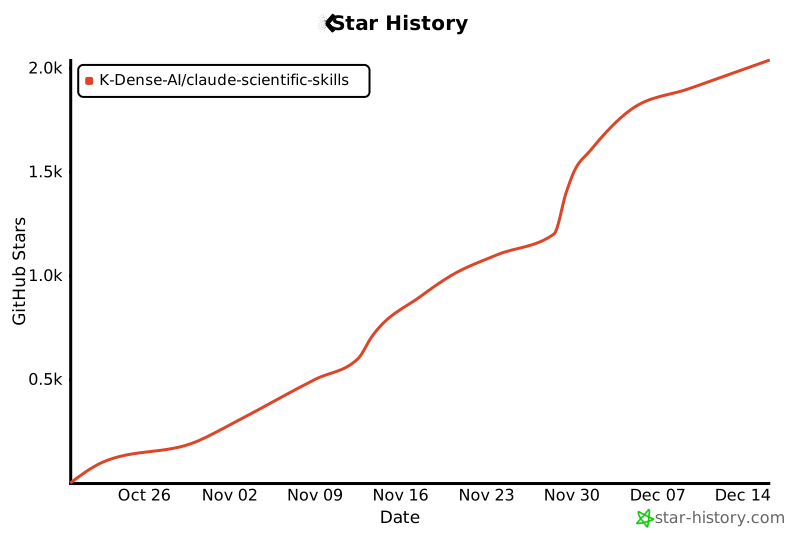](https://www.star-history.com/#K-Dense-AI/claude-scientific-skills&type=date&legend=top-left)